


Budge World: Learning & Fun
4.31.34K Reviews
App Specs
- Version
- 2026.11.0
- Updated On
- License
- Free
- Downloads
- 10,000,000+
- Developer
- Budge Studios
- Categories
- Educational
- Platform
- Android
Screenshots





 Analysis by AppCompare
I judge a children’s game not only by whether it holds a child’s attention, but by what happens when they tap the wrong thing, lose interest, or ask an adult to take over. Budge World: Learning & Fun brings familiar characters into a collection of playful activities, and its appeal is easy to understand: a child can pick a character they recognize and start exploring. The practical question is whether that mix fits your family’s routine, especially if you want a low-friction activity rather than a screen-time project that needs constant supervision.
Where families may get stuck
A familiar character can make the first few minutes inviting, but it can also shape expectations. A child who arrives looking for one particular show or character may be less interested in everything else. I’d let them explore a little before deciding whether the broader mix works for them; the app is better approached as a shared play space than as a guarantee that every activity will appeal equally.
Another possible sticking point is the difference between downloading a free game and having access to all of its content. Budge World is free to download, but in-app purchases are listed from $6.99 to $47.99 per item. That makes it worth checking what is available in the version you have before promising a child a particular activity. I’d handle any purchase decisions myself, rather than letting a young player explore payment choices unaided.
There is also a useful distinction between being educational and behaving like a structured lesson. This is an educational game built around playful activities, not a replacement for a teacher, workbook, or adult-guided practice. If your goal is a specific lesson—such as following a set reading sequence or tracking a skill against a curriculum—another tool may be a better match. Budge World makes more sense when you want a character-led activity that can sit alongside ordinary play.
Simple checks before handing over the device
I’d start by opening the game myself and letting it reach its playable screen before giving the device to a child. That small check can prevent a child from being left to interpret an unexpected prompt or a step that needs an adult. If the game is being installed on an older device, it is also sensible to check that the operating system meets the minimum requirement: Android 5.1 or later.
Next, agree on a simple plan: which activity the child wants to try, how long the device will be in use, and who handles any prompts about purchases or account details. This is a practical routine, not a claim about a particular control inside the game. Because young children may tap quickly, an adult nearby is the most dependable way to keep the session focused and avoid accidental choices.
The game is rated for Everyone, but that rating does not tell you whether its pace, characters, or activities suit your particular child. I’d spend the first session together and watch what they gravitate toward. A child who enjoys choosing, pretending, and trying short activities may settle in quickly; one who wants a single, clearly sequenced task may need more guidance or a different app.
Worth Reading Before You Choose

EA SPORTS FC Mobile 26 Is a Bigger Football Game, but It Takes Time

Flipboard Shows What News Apps Must Do Beyond the Feed

Switching to Android Auto Means Rethinking Your Driving Routine

Google Calendar Makes a Crowded Week Easier to Manage

Ludo King Makes the Most of the Minutes Between Plans

Baby Panda World Brings Quick Play to Modern Phones, but Its Game Library Feels Busy
What is Budge World?
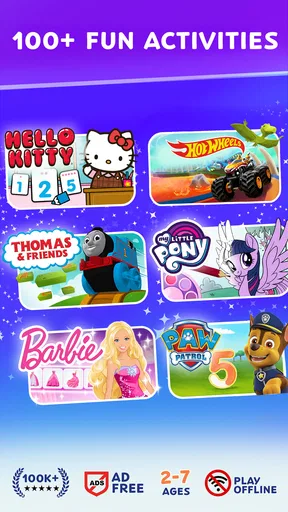
So, Budge World: Learning & Fun is like a digital theme park for kids. It’s packed with a variety of mini-games, activities, and stories featuring well-known characters from franchises like Barbie, Thomas & Friends, and My Little Pony. The app is designed for children aged 3 to 9, making it perfect for early learners who are just starting to explore the digital world.
A World of Characters
One of the coolest things about Budge World is the range of characters it includes. Kids can join Barbie on fashion adventures, help Thomas the Tank Engine with his railway challenges, or go on magical quests with the My Little Pony crew. It’s like having a toy box filled with all their favorite toys, but in a more interactive way.
Learning Through Play
The educational aspect of Budge World is woven seamlessly into the fun. Each game and activity has been crafted to teach kids various skills, from basic math and reading to creativity and problem-solving. For instance, helping Thomas on his railway challenges can improve spatial awareness and logical thinking. Meanwhile, dressing up Barbie or designing a pony helps enhance creativity and decision-making skills.
Easy Navigation for Little Fingers
Now, I know what you’re thinking—how easy is it for kids to navigate? Surprisingly, the app is very user-friendly. The interface is bright and intuitive, designed with little fingers in mind. Icons are large and clear, making it easy for kids to select their favorite games or switch between activities without any hassle.
Making the session work in real life
For a realistic use case, imagine a short wait at an appointment or a quiet stretch before dinner. I’d choose one activity with the child, sit nearby while they get started, and give them a clear stopping point before opening the game. This turns the character-filled activities into a small, bounded play session rather than an open-ended request for more screen time. It is especially useful when a child needs a calm distraction, though it is not a substitute for conversation, rest, or hands-on play.
A less obvious tip is to use the characters as a bridge back to offline play. If a child enjoys a creative activity, ask them to draw or make up a story afterward; if a puzzle or challenge catches their attention, talk through how they approached it. The game can provide a prompt for imaginative play, but the learning value is stronger when an adult notices the child’s choices instead of treating the app as a self-running lesson.
For siblings or children with different interests, take turns choosing what to explore rather than expecting one activity to please everyone. Familiar characters can make that negotiation easier, but the variety also means one child may be drawn to a different corner of the experience than another. If the device becomes a source of disagreement, a shared turn-taking rule is more useful than assuming the app itself will resolve it.
Comparing it with other learning apps
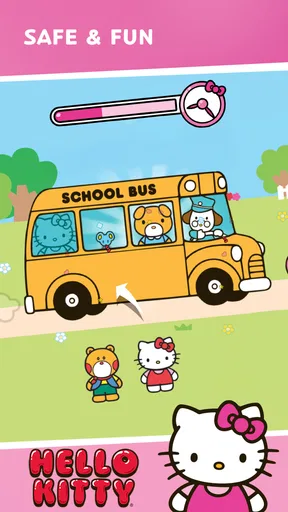
Compared with a focused phonics or maths app, Budge World’s character-led variety is its main advantage and its main trade-off. A child who is motivated by Barbie, Thomas, Hello Kitty, Crayola, or PAW Patrol may be more willing to explore than they would be in a plain practice app. On the other hand, families looking for a carefully ordered course, visible lesson progression, or one skill at a time may prefer a dedicated learning tool. I’d think of this as an entertaining supplement, not the strongest choice for targeted academic practice.
It also differs from a single-character game. The broader collection offers more kinds of play to sample, which can help when a child’s interests change, but that choice can make it harder to settle on one activity without adult help. If your child already knows exactly what they want, guiding them toward that choice can keep the session from turning into aimless tapping. If they prefer one familiar game repeated in the same way, a simpler standalone title may be less distracting.
When play needs a reset
If a session stalls or a child says something is not working, I’d first pause and look at what is actually on the screen rather than repeatedly tapping. Check that the device still responds, that the game has finished opening, and that the child has not landed on a prompt that needs an adult. If the device seems generally sluggish, closing other tasks and trying again later is a sensible basic step; it does not assume that the game itself is at fault.
If the difficulty appears only when trying to access a particular activity, step back and confirm whether it is available in the current setup before promising it. A free download does not mean every item is included without an in-app purchase. If the problem continues, note what the child was doing and what appeared on screen before seeking help through the app’s usual support route. Avoid deleting or reinstalling as a first reaction if you are unsure whether doing so could affect access or saved information.
For a child who keeps leaving the activity, try a shorter session and let them choose among the options that are already available. That can help distinguish a momentary distraction from a mismatch between the game and what they actually enjoy. If they repeatedly ask for a more guided task, a structured workbook or a focused educational app may suit them better than a broad character-based collection.
Parental Controls and Peace of Mind
As a parent, you might be concerned about what your child is exposed to in an app. Budge World has got you covered with its comprehensive parental controls. You can set limits on screen time, monitor progress, and even customize the experience to suit your child’s needs. Plus, the app is ad-free, so there’s no need to worry about unwanted interruptions.
What the ratings and cost tell me
Budge Studios develops the game, which has an average rating of 4.2 from around 33,000 ratings, alongside roughly 1,300 written reviews. It has passed 10 million installs, so it is a well-established choice among children’s games, though popularity alone cannot tell you whether its activities suit your family. I’d use those figures as context, then make the decision based on your child’s interests and how you want the device to be used.
The game is free to download, with in-app purchases ranging from $6.99 to $47.99 per item. That broad span is a good reason to review purchase options before a child plays and to treat access to paid content as a family decision. The age rating is Everyone, and the current version is 2026.3.0; the practical point for parents is to keep the app current through their normal device update routine, while checking that the device remains compatible.
Subscription and Accessibility
Here’s the deal—Budge World operates on a subscription model. While you can download the app for free, accessing all its features requires a subscription. Honestly, given the breadth of content and the educational value, it’s a fair deal. The app is available on both Android and iOS, so whether you’re team iPhone or Android, your kids can join in the fun.
Who will enjoy it—and who may not
I can see this working well for a young child who already likes the featured characters and enjoys switching between creative play and simple challenges. It may also suit a caregiver who wants a familiar, child-focused game to share and discuss rather than handing over a device for completely independent use. Its strongest use is casual exploration with an adult available when a choice or prompt needs explaining.
I’d be more cautious if you need a free, fully open collection, since purchases are part of the experience. I’d also look elsewhere if your priority is a precise learning pathway, detailed academic feedback, or a quiet activity with no character-led stimulation. Children vary in how they respond to bright, varied play, so a supervised first session is a better test than assuming the age rating means it will be right for every child.
Final Thoughts
All in all, Budge World: Learning & Fun is a delightful app that combines entertainment with education in a way that keeps kids engaged. It’s like having a mini classroom wrapped in their favorite cartoon characters. If you’re looking for an app that offers more than just entertainment, this one is worth considering. It’s a safe, fun, and educational digital playground that both kids and parents can appreciate.
Why not give it a try and watch your little ones embark on their next magical adventure?
My practical verdict is more measured: Budge World is worth trying when familiar characters are a genuine draw and you can guide the first few sessions. I would not choose it as a stand-alone teaching plan or assume that every activity is included at no cost. Set expectations around purchases and stopping time, then see whether the child returns to the activities with real interest. If they do, it can earn a useful place in a family’s short-play rotation; if not, a focused learning app or offline activity is likely a better fit.
Pros
- Engaging educational content for kids.
- Colorful and interactive user interface.
- Wide variety of mini-games available.
- Regular updates keep content fresh.
- Parental controls for safe usage.
Cons
- Requires internet connection to play.
- Some features need in-app purchases.
- May have frequent ads interrupting play.
- Limited content for older children.
- Occasional bugs can hinder performance.
FAQs for Budge World: Learning & Fun
What age group is Budge World: Learning & Fun suitable for?
Budge World: Learning & Fun is designed for children aged 3 to 10 years. The app offers a wide range of educational games and activities that cater to different age groups, ensuring that content is both age-appropriate and engaging. Parents can feel confident that their children are learning in a safe and fun environment.
Is Budge World: Learning & Fun available offline?
Budge World: Learning & Fun requires an internet connection for initial setup and to access some features. However, once certain games and activities are downloaded, they can be played offline. This flexibility allows children to enjoy learning and playing even when an internet connection is not available.
Does Budge World: Learning & Fun include in-app purchases?
Yes, Budge World: Learning & Fun offers in-app purchases. While the app provides a variety of free content, additional games, features, and customization options can be unlocked through purchases. Parents should monitor these purchases or set up parental controls to prevent unauthorized transactions.
How does Budge World: Learning & Fun ensure a safe environment for kids?
Budge World: Learning & Fun is committed to providing a safe environment for children. The app includes parental controls, no third-party ads, and is compliant with COPPA regulations. These measures ensure that children can explore and learn without exposure to inappropriate content or unwanted advertisements.
What kinds of educational content does Budge World: Learning & Fun offer?
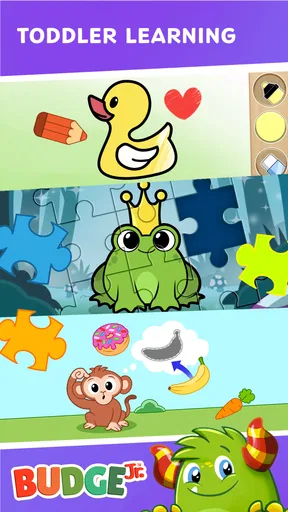
Budge World: Learning & Fun offers a diverse range of educational content, including puzzles, math games, reading challenges, and creativity-based activities. Each activity is designed to enhance cognitive skills, problem-solving abilities, and creativity, making learning enjoyable and multifaceted for young users.


